Spotify Playlist Promotion Results: Medicine Four Months Later
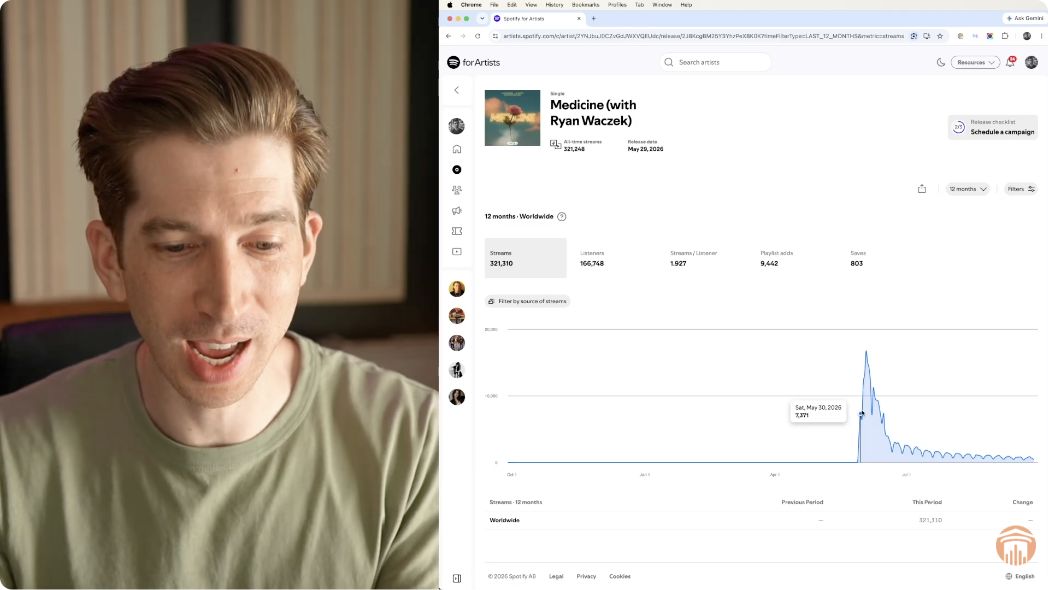
Almost four months after releasing Medicine, I opened Spotify for Artists to see what was still happening. The song had around 321,000 streams at the September 28 snapshot in this video. But the total wasn’t the part I wanted to dig into. I wanted to see how much listening was still coming from playlists, what Spotify’s personalized recommendations were doing, and whether people were playing the song from their own libraries.
That’s what I’ll walk you through here, so you can do the same check on your next release.
My original walkthrough, recorded September 28, almost four months after the release. The results and offer discussion in the video are historical; this article focuses on the release data.
What went into my Medicine release?
I put a big push behind this song. I did the equivalent of roughly four playlisting campaigns at once, and I had two other co-writers helping market it. So before you look at that 321,000-stream number, keep the size of the release effort in mind. This is my experience with this song, not a forecast for what one campaign will do for yours.
More playlists were added through release week. You can see that early buildup in the chart, followed by a peak and then a drop. By the time I filmed the update, some placements had ended, but others were still sending streams almost four months later.
I was happy about that. Some curators kept the song longer than I expected, and I couldn’t tell you exactly why. That’s one reason I like coming back to a release after the initial excitement has passed: you can see what actually lasted.
The release timeline shown around 1:35 in the video. The opening spike and later activity belong to this particular release.
What happened after the release-week spike?
Playlist promotion puts your music in front of someone else’s audience. I think of that as borrowed traffic. It can help people discover a song, but a placement doesn’t belong to you forever. If a curator removes the song, that source of listening can fall away.
With Medicine, I still had playlist activity when I recorded the update. I also saw personalized listening rise early and taper later. Looking at those separately was more useful than treating every stream as the same kind of result.
The next thing I wanted to check was listening from people’s own collections. Had that disappeared along with the opening burst, or was there still activity? Spotify’s source breakdown lets you get closer to that question.
How do I check where Spotify streams are coming from?
Open your track in Spotify for Artists and look for Segmentation → Source of Streams. Choose your time period and metric, then compare the release period with a later period using the same settings.
The video shows the interface I used at the time. For the current navigation and category definitions, you can also check Spotify’s source-of-streams guide.
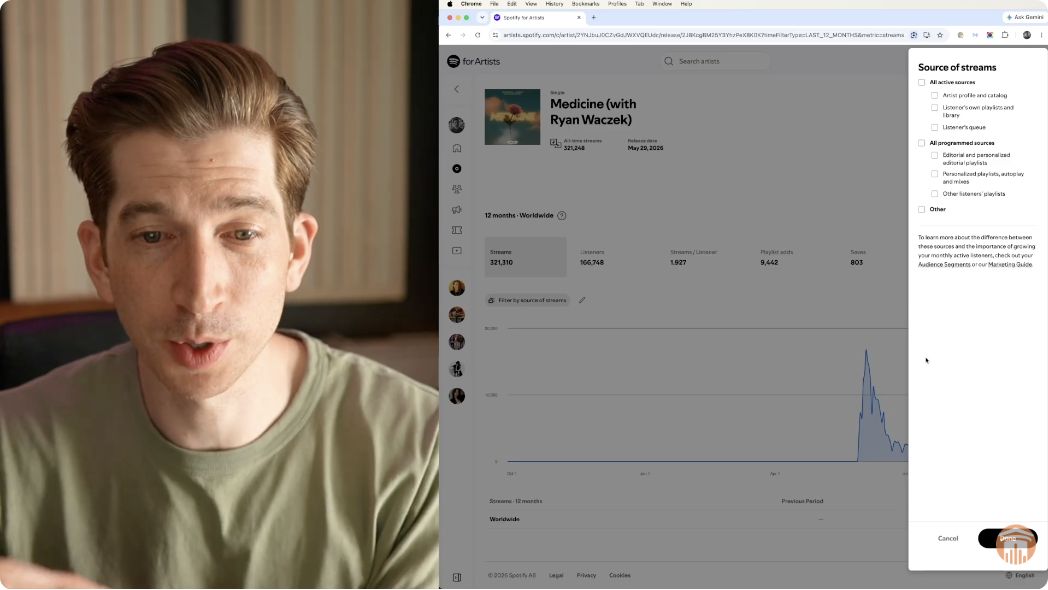
The source filter shown around 4:00 in the video. Separate the categories before drawing conclusions from the total.
Start with other listeners’ playlists
This category is playback from playlists created by other Spotify users. I use it to see how playlist listening changes over the release timeline. It doesn’t, by itself, identify which campaign brought in every stream.
If you’re evaluating the playlists themselves, I also have a walkthrough on my Spotify playlist evaluation process. That’s a separate check from reviewing your song’s results.
Then look at personalized listening
Spotify groups its personalized playlists, autoplay, and mixes together. That includes places such as Discover Weekly, Release Radar, and Radio.
For Medicine, this activity rose early and then tapered off, with some listening continuing at the time of the update. I can show you that pattern. The chart alone can’t tell us how much of it was caused by playlist promotion or give us a magic stream count that triggers recommendations.
Check libraries and catalog playback
I also looked at playback from listeners’ own playlists and libraries. This includes their Liked Songs, saved albums, and personal playlists. There was still activity here when I filmed, which was something I wanted to see beyond the initial playlist push.
Just be careful with the number: streams are plays, not a count of individual fans coming back. This category doesn’t tell us where each listener first found the song, either.
Artist profile and catalog is another useful view. It includes playback from your profile, album pages, and your “This is...” playlist. It’s broader than someone visiting your profile, so I wouldn’t describe every play in that category as a direct profile visit.
What would I check on my next release?
I’d start with the same question: what’s still happening after release week? Then I’d work through the sources instead of stopping at the headline total.
Keep the release effort in view. Note what you and any collaborators did to promote the song.
Compare like with like. Use the same metric and filters when comparing periods.
Separate the sources. Look at user-created playlists, personalized listening, libraries, and catalog playback.
Write down what continued. Then identify what you still need to investigate before planning the next push.
For me, the encouraging part of this release was that activity continued beyond that first burst. Your release may look different. The point of this review is to understand your own song well enough to make the next decision.
Common questions
Can I check results for one country?
Yes. Spotify supports country filters alongside compatible date ranges and metrics. Keep the country selection the same in both periods if you’re comparing a particular market.
Can I do this for an album instead of one song?
Yes. Source of Streams is available on Release and Audience overview pages as well as individual Song pages. Pick the view that matches the release you’re reviewing.
Should I look at streams or listeners?
Use streams when you want to review plays and listeners when you want to review the listener metric. Spotify also offers streams per listener for compatible selections. Label your notes clearly so a play count doesn’t turn into a claim about how many fans you gained.
Planning your next release?
If you’d like to explore playlist promotion as part of your next release plan, take a look at IMA’s Spotify playlist promotion options.